ARFID Planner
Meal planning for households where “just eat something else” isn't a useful solution.
- Status
- Paused
- Launched
- June 2026
- Built with
- Next.js, TypeScript, Supabase, Vercel
Overview
ARFID Planner is meal planning designed around safe foods, individual needs, and households where “just eat something else” isn't a useful solution.
It's one of my clearest examples of starting with a very specific real-world problem and building software around the people experiencing it, rather than forcing the problem into an existing software model.
The problem
Most meal-planning apps start with a reasonable assumption: members of a household can eat broadly the same food. For families dealing with extremely restrictive eating, that assumption falls apart.
Planning meals becomes less about choosing recipes and more about coordinating safe foods, nutritional needs, different meals for different people, and the limited foods someone can reliably eat.
Traditional meal planners weren't designed around that problem. I wanted something that was.
What I built
ARFID Planner is a household meal-planning app designed around safe foods first. Rather than forcing people into a conventional recipe-planning model, households keep lists of foods that work for individual members, and plan meals from those.
It's built with Next.js, with Supabase providing authentication and application data, and it's deployed on Vercel. The real work was thinking through the relationships between households, members, safe foods, meals, nutrition and permissions, rather than building a collection of independent screens.
Key features
- Weekly meal planning
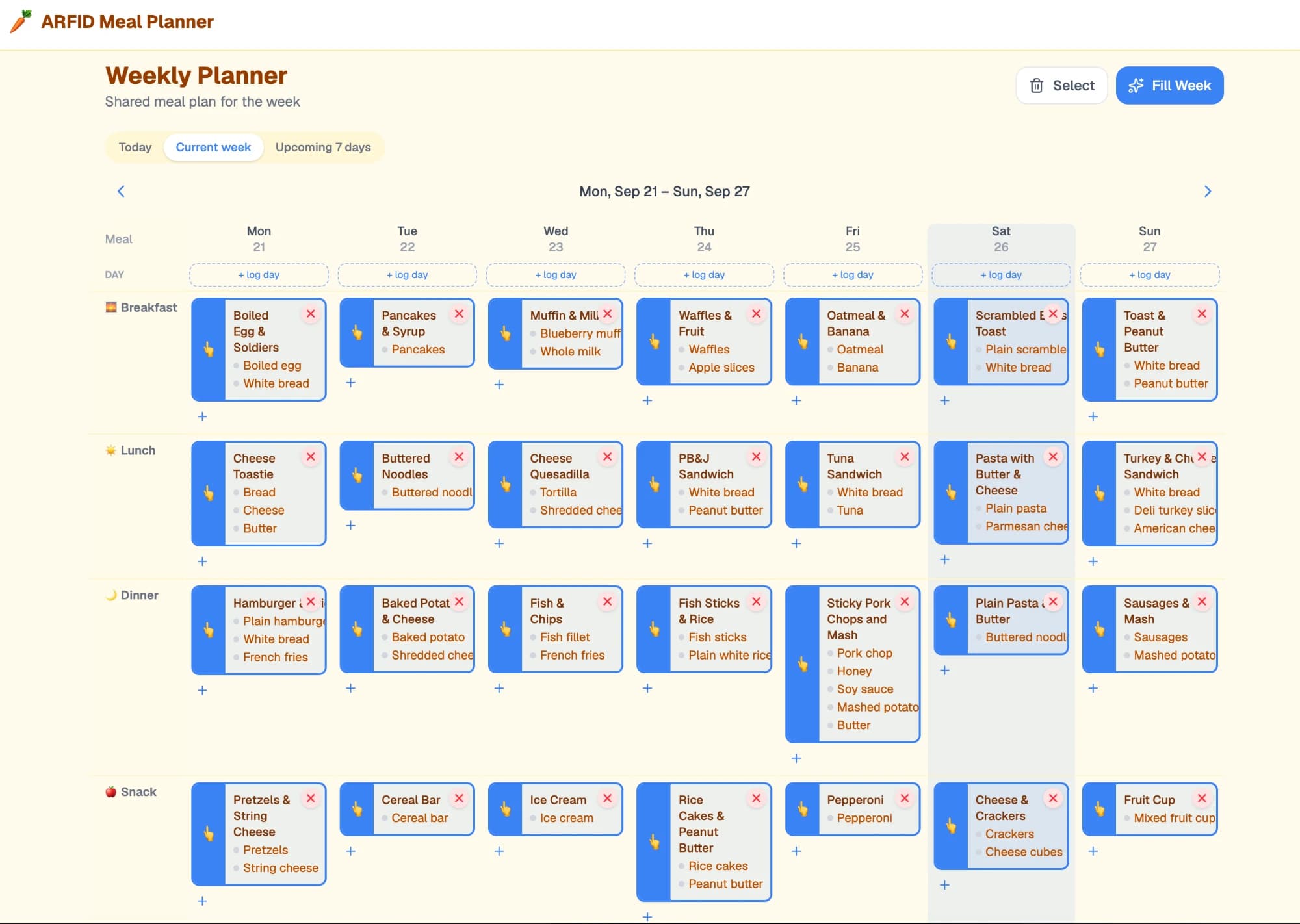
- Breakfast, lunch, dinner and snacks across the week, with today, current-week and upcoming-7-days views.
- Individual safe-food lists
- Each member keeps their own list of foods that work for them.
- Custom meals
- Combine safe foods into meals that work.
- Daily nutrition totals
- What someone is actually eating, added up per day.
- Individual nutrition targets
- Targets belong to a person, not the household.
- Household sharing
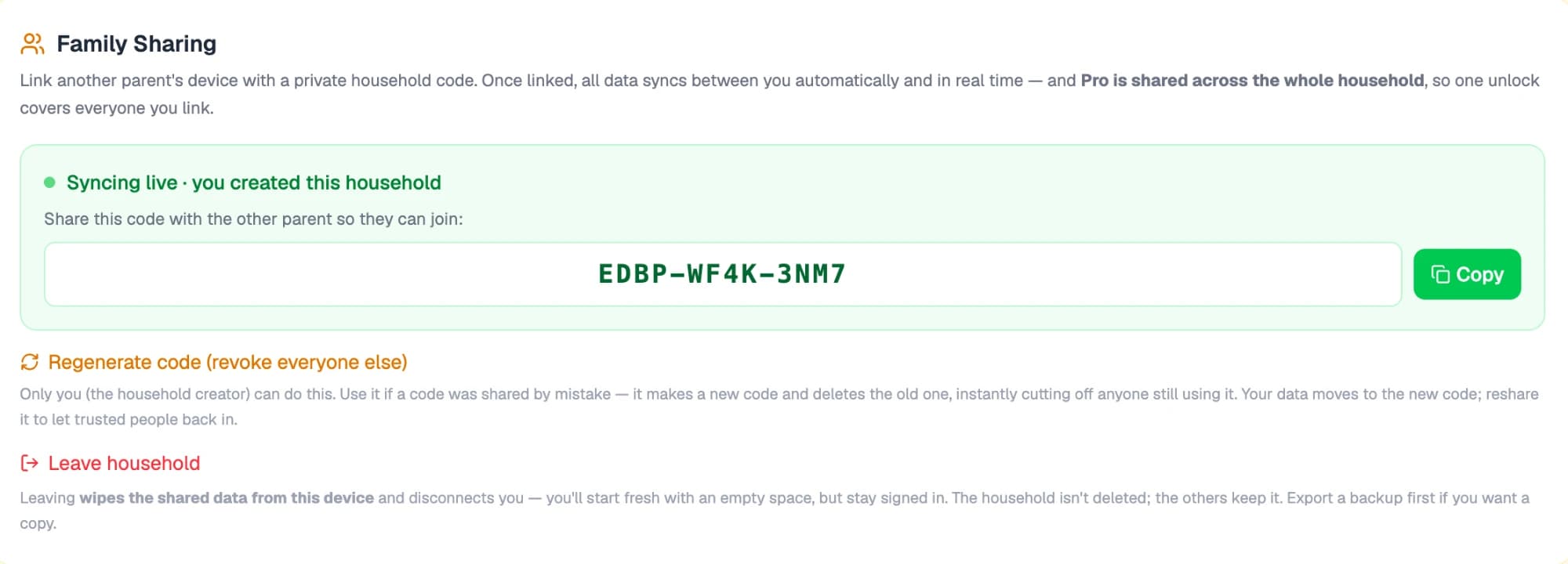
- Another parent links their device with a private household code, and data syncs between them in real time.
- Pro for the household
- One Pro unlock is shared across everyone linked to the household.
- Barcode scanning
- Add packaged foods by scanning them instead of typing.
- 30-day export
- Take a month of data outside the app.
Interesting problems
Designing for households
The data couldn't simply belong to one user. Food preferences and safe foods belong to individuals, while meal planning often happens at the household level. That meant thinking carefully about the relationships between accounts, household members, foods, meals and shared planning. Household codes let family members take part in the same household without treating everyone as a single user.
Access that can be taken back
A shareable code is convenient, but codes get shared by mistake. Only the household's creator can regenerate the code, which deletes the old one, immediately cuts off anyone still using it, and moves the household's data to the new code. Leaving a household works the other way round: it wipes the shared data from that device and disconnects it, while the household itself stays intact for everyone else.
Safe foods aren't just ingredients
Restrictive eating doesn't necessarily follow conventional food categories. A particular product, preparation method or version of a food may be fine, while something almost identical isn't. So the product avoids making assumptions about what people should eat, and gives households control over defining what actually works for them.
Nutrition without judgement
Nutrition tracking is there to help households understand what someone is actually consuming over time, not to be another calorie-counting app. Daily totals and individual targets surface patterns or gaps, while leaving decisions with the person, their family and their health professionals.
Barcode scanning
Scanning removes some of the friction of adding packaged foods. That matters more than usual here, because specific brands and products can be the difference between a food that's safe and one that isn't.
Decisions & trade-offs
Safe foods first, recipes second
The core unit of the app is the food a specific person can eat, not a recipe. Everything else, from meals to plans to nutrition, is built on top of that.
Don't lock the data in
Restrictive eating often involves more people than the person eating: parents, caregivers and health professionals may all need to understand what's happening. Household sharing and a 30-day export let people take useful information outside the app.
Outcome
ARFID Planner became a functioning application at arfidplanner.com, combining household meal planning, safe-food management and nutritional information in a product designed specifically around restrictive eating.
It's paused for now. I took the database down because I was finding the site too cumbersome, and I may come back to it at a later date.
What I learned
ARFID Planner taught me a lot about designing software for a problem that doesn't fit neatly into conventional application patterns. The technically easiest solution isn't always the right product solution.
It also reinforced the value of building around real behaviour rather than an idealised version of how people are expected to behave. If someone's list of acceptable foods is unusual, the software's job isn't to correct them. It's to make that information useful.
Tech
- Next.js
- TypeScript
- Supabase
- Vercel
Screenshots